
Have a Question?
Exporting Hour Timesheet Data to ADP
Supported ADP Versions
- ADP Run
- ADP TotalSource
- ADP Workforce Now
Before a csv file can be created from HTS for ADP, you must first provide the proper payroll items to the Hour Timesheet support desk so they can enter these codes on the back-end.
Please send the pay codes that ADP requires to support@hourtimesheet.com
Saving ADP Exporting Settings (A One-time Requirement)
Timesheet data created in Hour Timesheet can be exported to ADP using a csv file. To export data from Hour Timesheet, follow the instructions below.
- Login to your Hour Timesheet login page as user with admin or accountant role
- Navigate to the Export/Payroll Settings menu item.
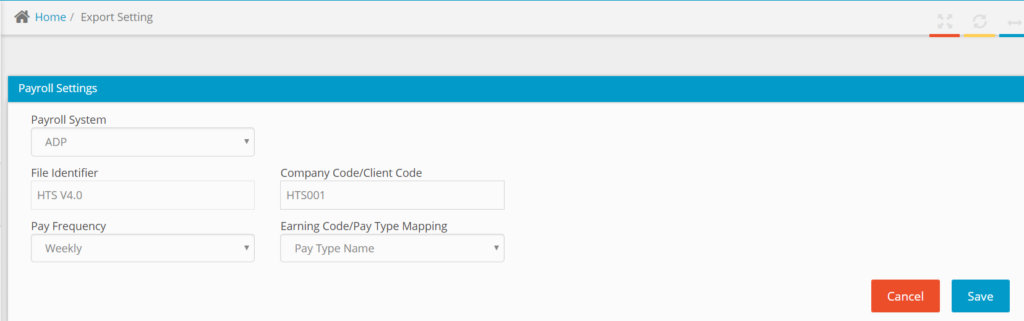
- Complete the Payroll Settings data fields
- Payroll System – Select AD
- File Identifier – Hour Timesheet will create a unique file name for you.
- Pay Frequency – Select from Weekly, Bi-weekly, Semi-monthly or Monthly
- Enter the Company Code/Client Code
- If additional mapping is required, select the field that maps to the Pay Types in ADP from the Earning Code/Pay Type Mapping drop down provided
- Click Save
Exporting Timesheet Data to ADP
Navigate to the Export/Payroll Settings menu item. Place a check in the box next to the timesheet(s) that you would like to export
- Click the Export Selected button to begin the sync process.
- A pop-up box will appear confirming the records to be exported.
- Click the Export button to complete the export process request
- Contact ADP to activate the Time Sheet Import feature in your account
Custom Export [Video clip]