
How Hour Timesheet Tracks Comp Time
Comp Time (Compensatory Time) in Hour Timesheet allows organizations to award employees additional paid time off based on hours worked beyond their standard schedule. HTS provides a configurable, rules‑based engine that automatically calculates, accrues, and limits Comp Time based on your company’s policies.
This article explains how HTS tracks Comp Time, how accruals are calculated, and how administrators can configure Comp Time rules.
1. How Comp Time Works in HTS
HTS tracks Comp Time using three core components:
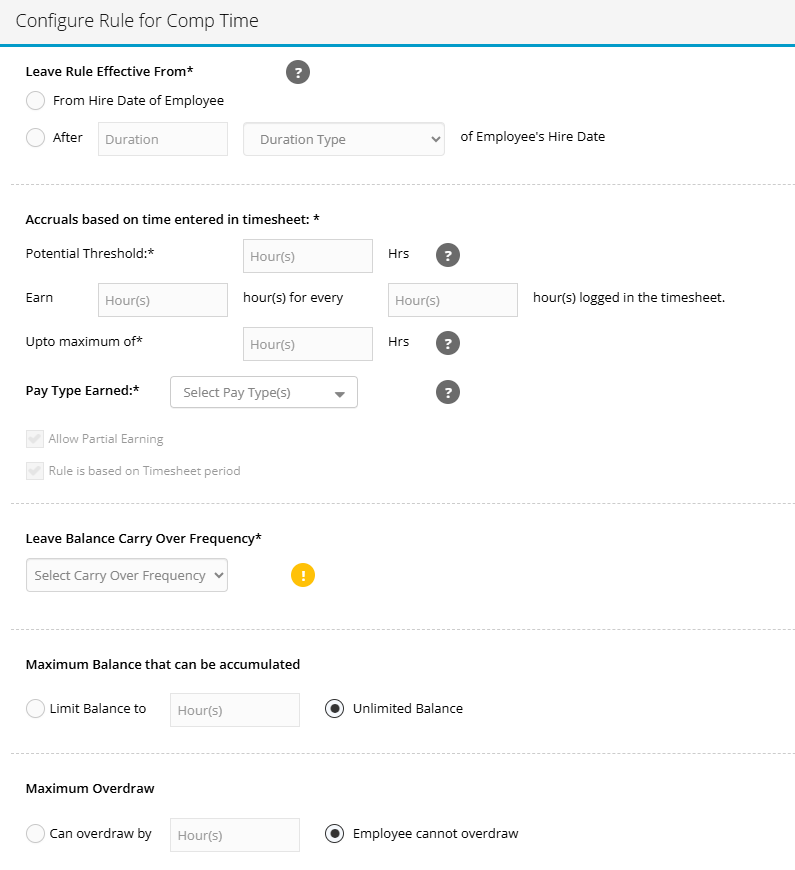
Eligibility Window You choose when the Comp Time rule becomes active for an employee:
- From the employee’s hire date, or
- After a specified duration (e.g., after 90 days of employment)
B. Accrual Based on Timesheet Hours
Comp Time is earned automatically based on hours entered in the employee’s timesheet.
Administrators define:
- Potential Threshold
The minimum number of hours an employee must log before earning Comp Time.
Example: Earn Comp Time only after working more than 40 hours in a week. - Accrual Ratio
How many Comp Time hours are earned for every hour worked above the threshold.
Example: Earn 1 hour of Comp Time for every 2 hours worked. - Maximum Earnable Hours
A cap on how much Comp Time can be earned within the accrual period. - Pay Type Earned
The pay type that Comp Time accruals will be posted to (e.g., “Comp Time Earned”).
HTS automatically calculates accruals each time the employee submits a timesheet.
C. Balance Management
HTS tracks the employee’s Comp Time balance and applies your organization’s rules for:
- Carryover frequency (e.g., monthly, quarterly, annually)
- Maximum balance limits
You may set a hard cap or allow unlimited accumulation. - Overdraw permissions
You may allow employees to go negative up to a defined limit, or prevent overdrawing entirely.
These settings ensure balances remain compliant with internal policy and audit requirements.
2. What Employees See
Employees can view:
- Their current Comp Time balance
- Accruals earned from recent timesheets
- Any carryover adjustments
- Any reductions due to usage or balance limits
All calculations are automated and visible in their Leave Balance section.
3. What Supervisors and Admins See
Supervisors and admins can:
- View employee Comp Time balances
- Review accrual calculations tied to specific timesheets
- Audit carryover and balance‑limit adjustments
- Modify or correct balances when needed (with audit logs)
4. How HTS Calculates Comp Time (Example)
If your rule states:
- Threshold: 40 hours
- Accrual: 1 hour earned for every 2 hours worked
- Maximum: 8 hours per period
And an employee logs 46 hours in a week:
- Hours above threshold: 6
- Accrual calculation: 6 ÷ 2 = 3 hours
- Maximum check: 3 hours is below the 8‑hour limit
- HTS posts 3 hours of Comp Time Earned to the employee’s balance
All of this happens automatically when the timesheet is approved.
5. Frequently Asked Questions
- Does HTS support partial Comp Time earning? Yes, if enabled in your rule configuration. (Some organizations require whole‑hour increments.)
- Can Comp Time be tied to specific pay types? Yes. You select the pay type that accruals post to.
- Does Comp Time accrue based on timesheet periods? Yes. Comp Time in Hour Timesheet is calculated within each individual timesheet period. It does not calculate across multiple periods, even if a workweek spans two different timesheet cycles. This is an important distinction for clients who use semi‑monthly, monthly, or any period that does not align with a standard 7‑day workweek.
- Can employees go negative? Only if you enable overdraw and set a limit.